Emails that look like your shop
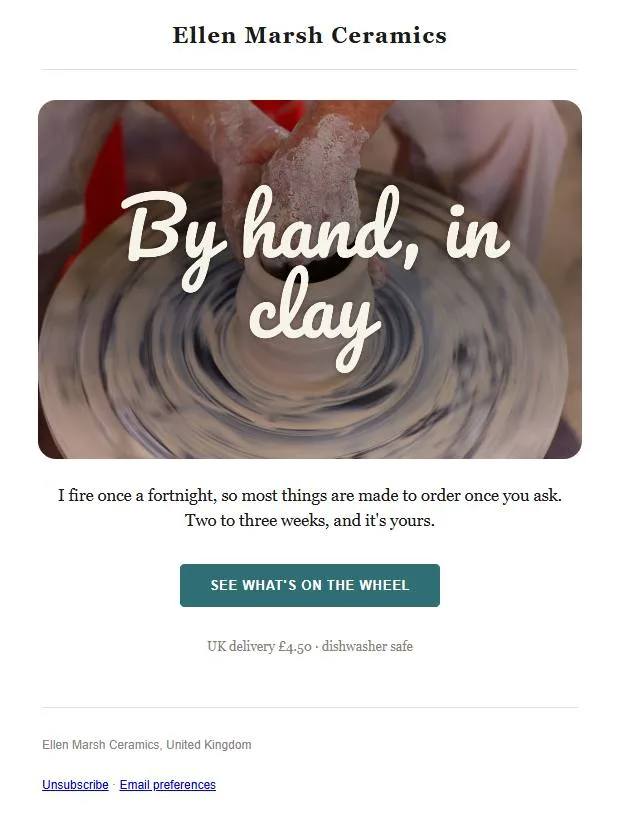
An email in your brand in a few minutes
Start from a ready-made design or a blank one, with your colours, fonts and logo already in place. On a paid plan you can describe the email in a sentence and get a finished design back.
- Blocks for products, reviews, countdowns and discount codes
- Show a block only to some people, such as one group
- Your brand colours and fonts in every block
Send it now, later or at each person’s best hour
Choose who it goes to and see how many people that is before you send. Best time sends to each person at the hour they usually open their email.
- Send yourself a test first
- Preview text to go with the subject line
- Stop a send part-way if you need to
Set up to land in the inbox
Send from your own domain on any plan. Every email has a one-click unsubscribe, bounces and complaints are dealt with for you, and Inbox health shows your delivered rate with each inbox provider.
Emails that send by themselves
Each drip starts when something happens, such as a sign-up, an order or a birthday, and sends its emails in the order you set, with a wait between each one.
- Starts on a sign-up, an order, a date or a new review
- Steps that send an email, wait, check a condition or update a person’s details
- A yes path and a no path after each condition
- Ends early when someone buys, if you want it to
Cruise writes and sends your emails
Choose the days it sends on, and Cruise writes each email from your products and photos and any notes you add, in the tone you describe. Turn on approval and each email waits for your OK.
- Uses only the photos you’ve allowed it to
- Cruise’s days show on your calendar
See what each email brought in
Opens and clicks come in as they happen, and for a Shopify store, so does the revenue each email brought in.
- Bounces and unsubscribes next to opens and clicks
- How your list has grown over time
- Ask a question about your results in plain words (paid plans)
- Percent or money off, free delivery, or buy one get one
- Codes that last a set number of days from the email
- The orders each discount brought in
Start on the free plan
Up to 100 people and 500 emails a month, with no card needed.