Browser notifications
Notifications on your customers’ screens
Visitors to your site can choose to hear from you. Your notifications reach their computer or phone whether or not your site is open, and every plan includes them.
Ask
Your site asks, in your words
Choose what the ask says and when it shows. A form’s thank-you can ask too, and then the browser belongs to the person who filled in the form.

A small card asks first, in your words, and the browser’s own prompt only shows after a yes. Someone who says not now isn’t asked again for 30 days.
- Shows after a visitor’s second page, or after they add to their basket
- On Shopify, one switch in your theme’s App embeds
- On WooCommerce, a tick box in our plugin
- On any other site, one small file to upload
Send
Send one when something new comes in
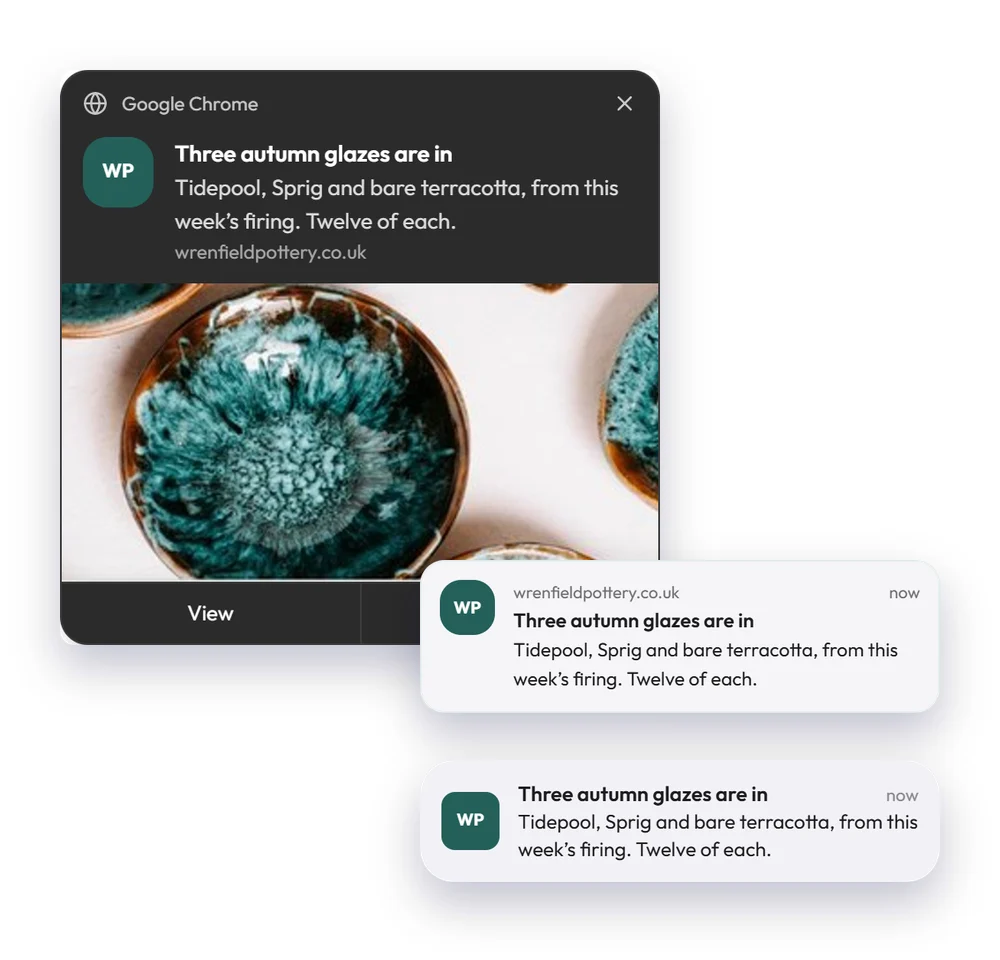
A notification opens the page you choose, such as a new collection or a sale. It shows your logo, and on Windows and Android a picture too.
Write a title and a line or two, add a picture if you like, and see how it looks on Windows, Mac, Android and iPhone before it goes.
- Send now, schedule it or spread it over a few hours
- To everyone who allowed, or the browsers of a group or list
- One campaign notification a day at most for each browser
- A test to your own browser first
Where they show
On computers and phones
On a computer they show in Chrome, Edge, Firefox and Safari, and on Android phones too. iPhones and iPads show them once someone adds your site to their Home Screen.
Every plan
Each one counts as a send on Free
9pm to 8am
When nothing arrives, wherever they are
Automate
Notifications that send by themselves
Put a notification in a drip beside its emails, such as a reminder an hour after someone leaves their basket.
Add a Send a notification step to any drip. A ready-made drip sends a notification an hour after someone leaves something in their basket, then an email the next day.
- On the same canvas as the email steps
- Skipped for anyone without a browser that allows them
Results
See who allows them and who taps
Every browser that allows your notifications is listed, and every notification shows how many people tapped it.

Browsers
People, then Browsers, lists every browser that allows your notifications, and whose it is when we know.
- A person’s page shows their browsers
- A group of everyone who allows notifications
Start on the free plan
Up to 100 people and 500 emails a month, with no card needed.